
Adding a New Field
- Go to Manage Fields > click “Add”
- Fill out:
✅ Field Name & Description – Use a clear, recognizable name and optional description.
✅ Total Field or Split Option – Choose whether the field is booked as a whole or split into subfields (e.g., Half A / Half B).
Creating a Field Plan
Once your field is created, click “Add Plan” to set up its details:
✅ Category – Choose the field category (e.g., football, tennis).✅ Pitch Name – Add a name for the subfield or section.
✅ Capacity – Define the max number of players allowed.
✅ PT Capacity – Optional: Set if personal training sessions happen there.
✅ Online Booking – Enable this if clients can book the field online.
✅ Display Options – Choose to hide the field image or size on the client-facing widget if preferred.
Renting the Field
If it’s a rental field:
- Set a Price & Duration – Specify how long a session lasts and how much it costs.
- Schedule Availability – Set when the field is bookable.
Field Cancellation Policy
Go to company settings > Basic Business settings > Enable the Cancelation Policy
Set a Cancellation Window (e.g., 1440 = 24 hours).
Then choose the Cancellation Type (percentage or fixed amount) and set the Fee (e.g., 50%).
👉 Example: If a member cancels within 24 hours, they are charged 50% of the booking fee.
Field View & Management
In the Fields section, you'll see all your fields and rooms.
- Click on a field to:
- Add a reservation for a client
-
- Block the field (e.g., for maintenance)
-
- Option to repeat the reservation weekly
- Option to repeat the reservation weekly
- Filter by:
- Category
- Specific Field
- Day or Week View
- Category
✅ Field Booking Status Colors:
- Yellow – Pending Arrival
- Green – Arrived
- Red – No Show or Late Cancelation
You can also watch this YouTube video for a clearer explanation
Fields Module Design Uplift:
- The Fields Module has been redesigned to match the Appointments Module, providing a consistent user experience across the portal.
- The updated interface offers a cleaner, more intuitive layout for managing bookings and schedules.
- Improved navigation and streamlined workflows make scheduling tasks easier and more efficient.
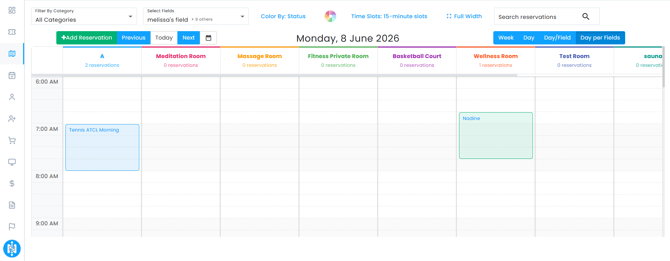
- The redesigned Fields Module is optimized for mobile use, making it more user-friendly and easily accessible on phones.
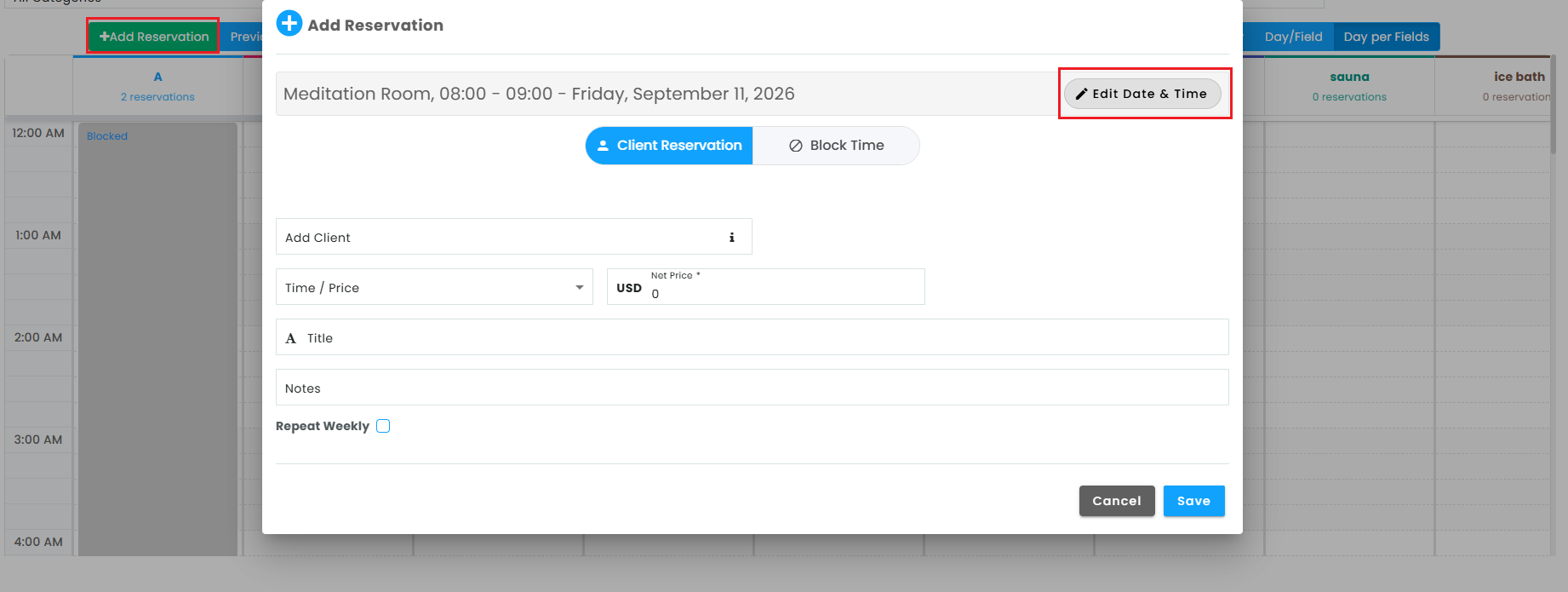
Now you can edit the reservation date and time easily from the add reservation button!