
Understanding Class Earnings
The Class Earnings report allows you to track how much money your business is generating from each class session. This tool is especially useful for monitoring class profitability, instructor performance, and client attendance trends.
Where to Find It
- Go to the left-hand menu in the IN2 system.
- Click on Reports.
- Under the Financial section, select Class Earnings.
What the Report Displays
When you open the report, you’ll see a detailed table that includes:
- Class Name – The title of the class.
- Date – The date on which the class occurred.
- Instructor – The trainer or staff member who led the session.
- Category – The class category (e.g., Fitness, Yoga, Martial Arts).
- Attendees – Number of participants who joined.
- Sessions Owed – Indicates if any client owes a session.
- Membership – Whether the session was booked using an unlimited package.
- Earnings (USD) – Total revenue earned from the class.
- Net Earnings (USD) – Revenue after deducting tax.
- Tax Amount – Tax applied on the class earnings.
Filtering Options
To make analysis easier, use the filter options at the top:
- Date – Filter by a specific date or date range.
- Class Schedule – View by scheduled class blocks.
- Class – Filter by specific class names.
- Category – Focus on class types or themes.
- Class Level – View beginner, intermediate, advanced.
- Instructor – Filter by who conducted the session.
- Branch – Select based on business location.
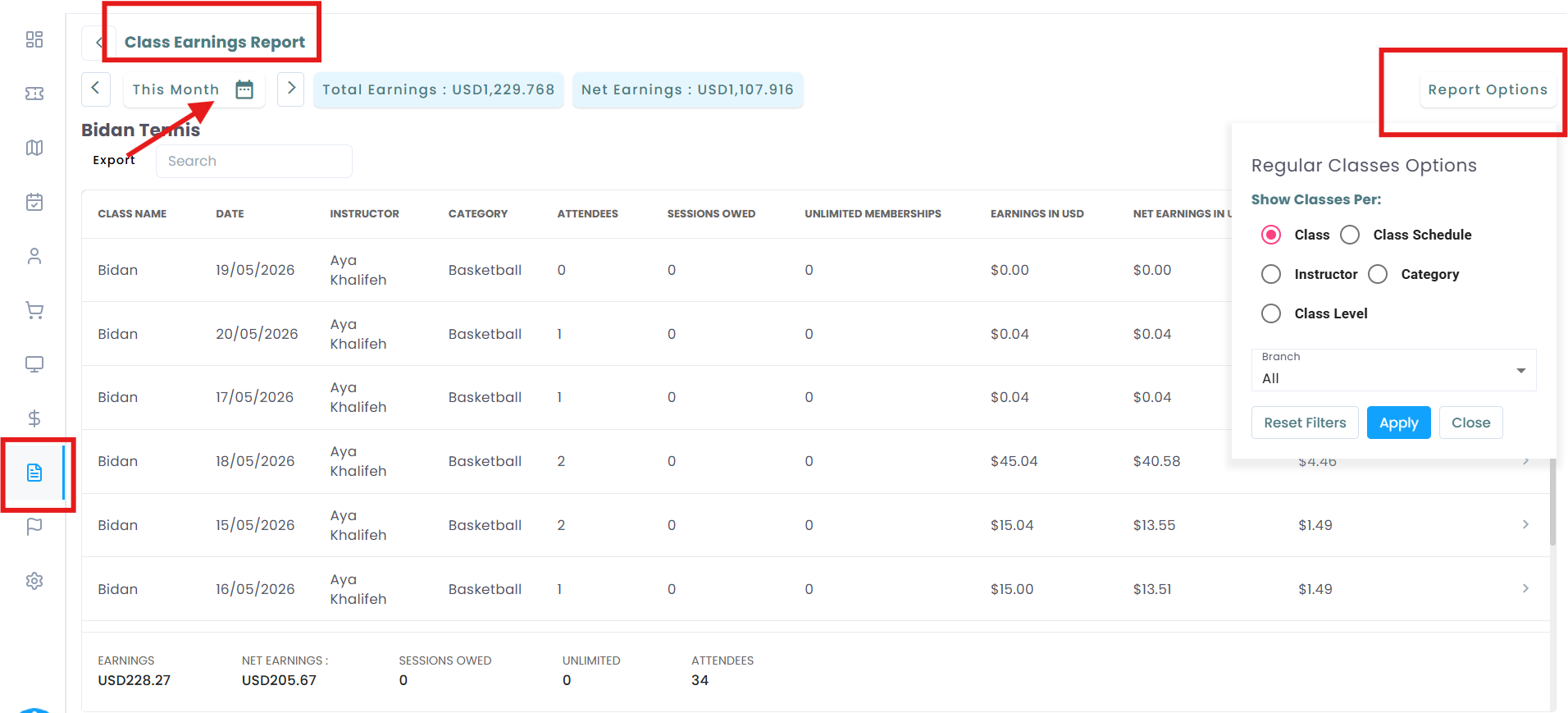
Totals & Summary
- Each class type will show:
- Total Earnings – Gross income from that class group.
- Net Earnings – Income after tax deductions.
- Total Earnings – Gross income from that class group.
These totals are found at the top or bottom of each group in the report.
✅ Why Use This Report?
- Understand which classes generate the most revenue.
- Identify trends across instructors, locations, and levels.
- Monitor and reconcile sessions owed and membership usage.