
Keeping your account active and your billing transparent is essential for uninterrupted service. This guide walks you through managing your Subscription Settings, settling balances, and accessing your payment history.
1. Accessing Subscription Settings
You can manage your account status directly from the portal. Even if your subscription has expired and you are currently logged out, you will still have access to this specific section to settle your balance and restore service.
- Navigate to: company settings > Scroll to the bottom of the page to find the Subscription settings section.
2. Understanding Your Subscription Details
Once you enter the Subscription section, you will find three primary tabs to help you stay organized:
-Subscription Details
-Summary
-Transactions
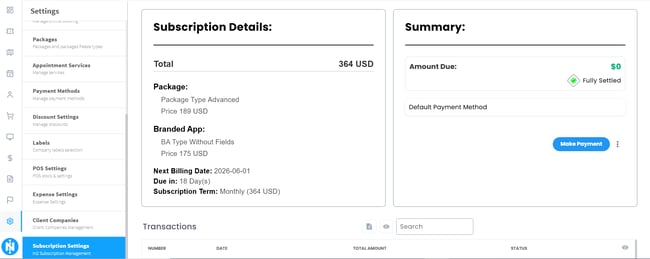
View exactly what you are paying for, including your main subscription, branch add-ons, or BA services.
-Summary
A high-level overview of your current plan and renewal dates.
-Transactions
A full ledger of your billing history and invoice statuses.
3. Making a Payment
To settle an outstanding invoice, click the Make Payment button and select your preferred method:
- Credit/Debit Cards: Choosing "Pay My Balance" via card is usually instant, and your account status will update immediately.
- Bank Transfers: After uploading your proof of payment, our system performs an automatic check. Please note that bank transfers can take up to 5 business days to reflect in our system. The notification banner will disappear once the transfer is verified.
4. Auto-Pay & Transaction History
To ensure your service is never interrupted, we recommend the following:
- Enable Auto-Pay: Select the first option in your settings to turn on Automatic Payments. This removes the monthly hassle of manual renewals.
- Download Invoices: In the Transactions tab, you can click the Date column to sort your history. From here, you can identify pending invoices or download PDF copies for your tax and accounting records.
Need Help?
If you encounter any issues or have questions regarding your specific plan, please reach out to our support team for assistance.