
-
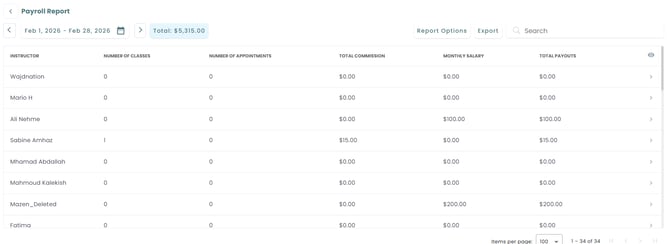
Trainer Overview – For each trainer, you’ll see:
-
Number of Classes Taught – The total count of group classes the trainer has delivered during the selected period.
-
Number of Appointments Held – The total number of one-on-one or private sessions conducted.
-
Total Commission Earned – The sum of all commissions generated by the trainer from their classes and appointments.
-
Monthly Salary – The fixed base salary the trainer receives (if applicable).
-
Total Payouts – The combined amount of salary + commissions, representing the final payout owed to the trainer.
-
-
Report Options – Filter By Schedule
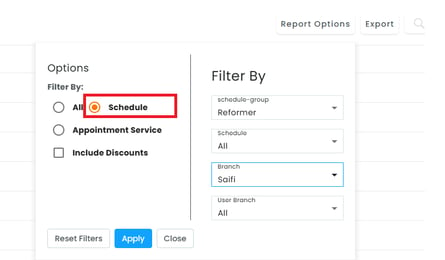
Selecting All includes every schedule type with no filtering applied, while Appointment Service filters the report to appointment-based services only. Selecting Schedule under Filter By lets you narrow the report down using these options:
- schedule-group – Choose a broader category (e.g., Reformer).
- Schedule – Narrow to a specific schedule, or leave as All.
- Branch – Limit results to one location (e.g., Saifi).
- User Branch – Filter by the branch a trainer/user is assigned to.
- Include Discounts – Check to include discounted classes/appointments in the totals.
Use Apply to run the report, Reset Filters to clear selections, or Close to exit.
-
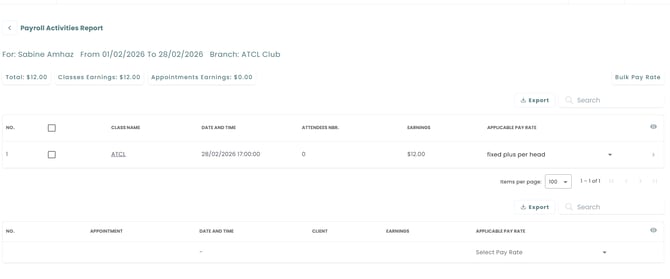
Detailed View – Click on a trainer’s name to open their individual report. You’ll find two sections:
-
Classes – shows class names, dates, times, number of attendees, and the applicable pay rate.
-
Appointments – shows appointment details with the same breakdown.
-
Pay Rate Management – In the applicable pay rate column, you can:
-
Keep the default pay rate that was set.
-
Or apply a new custom pay rate directly in the report.
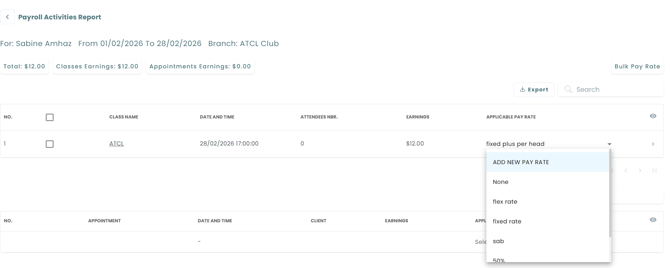
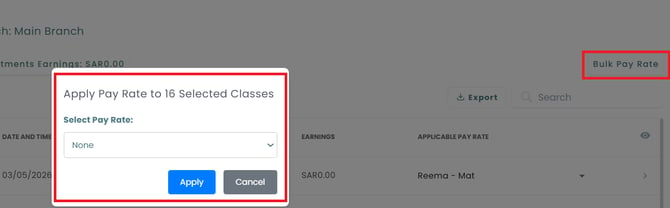
You can also choose Bulk pay rate by selecting all classes and choosing the pay rate.
-
-
✅ Why It’s Important: This report helps you monitor trainer activity, calculate payouts correctly, and maintain trust by ensuring trainers are compensated based on real data. It also makes payroll processing faster and more accurate.