
Here's how to manage it:
Create or Edit Your Waiver
- Go to Company Settings > Online Booking > Edit Waiver.
- Enable “Edit Waiver” to start customizing your waiver template.
- Write your content using the available text editor. You can:
- Add your own text, disclaimers, and policies.
- Customize font styles, sizes, and formatting to match your branding.
- Add your own text, disclaimers, and policies.
- Don’t forget to click Save once you’re done.
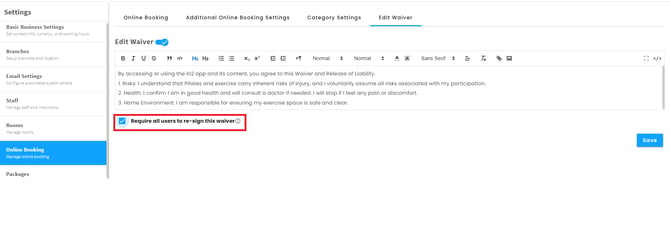
Require all users to re-sign this waiver
Select it and save when you want to reset all existing signed waivers, requiring users to sign the updated waiver again.
How It Works for Clients
- The waiver is automatically shown to new clients when they first register through the app.
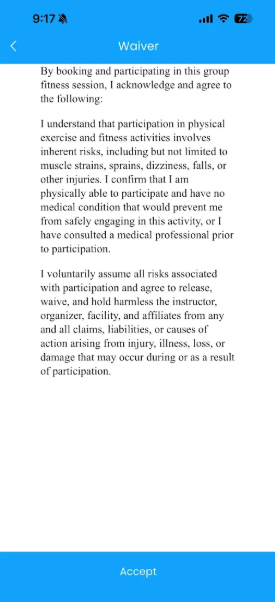
- Once a client signs the waiver:
- Their profile will display the waiver as “Signed.”
- You can verify this by clicking Edit Profile — a checkbox will be ticked indicating that the waiver is complete.
- Their profile will display the waiver as “Signed.”
VIEWING SIGNED WAIVER STATUS
Track which clients have signed their waiver directly from the Clients module.
1. Open the Clients Module
Clients
2. Open Column Settings
Click the eye icon (top right of the table) to open Edit Columns
3. Enable the Waiver Columns
Check the boxes for:
- Signed Waiver – shows
true/falsefor whether the client has signed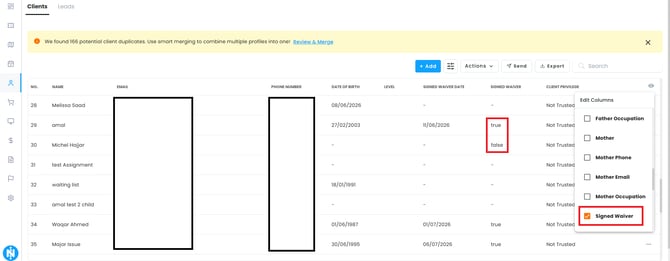
- Signed Waiver Date – shows the date the waiver was signed (or
-if not signed)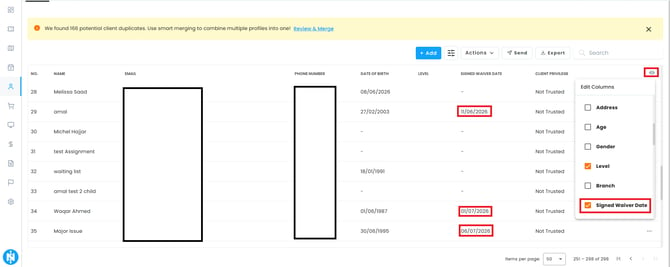
4. Review the TableThe columns will now appear in the Clients list, letting you quickly scan who has and hasn't signed.
Both columns can be enabled together or separately, depending on whether you need the status only or the exact date as well.
📌 Note: Existing clients won’t be prompted to sign unless the waiver is reset or updated manually.