
If a staff member is trying to add a new staff profile but cannot click the “OK” button to save, it is usually because they do not have permission to edit staff access levels.
When creating a new staff account, the system requires the user to have permission to manage staff roles and access levels. If this permission is missing, the “OK” button will remain disabled and the staff profile cannot be saved.
Solution:
A staff member with Level 5 access (full permissions) needs to grant the required permission.
Follow these steps:
-
Go to Company Settings.
- Click on Staff.
-
Click on Staff Roles.
-
Edit the role assigned to the staff member.
-
Enable the permission “Edit Staff Access Level.”
-
Click Save.
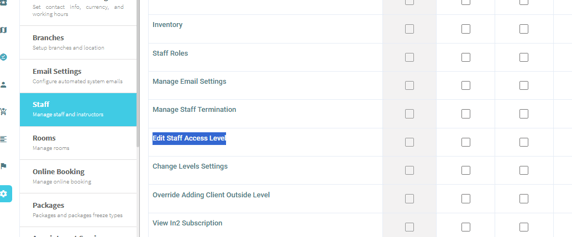
Once this permission is enabled, the staff member will be able to add a new staff profile and click “OK” to save successfully.